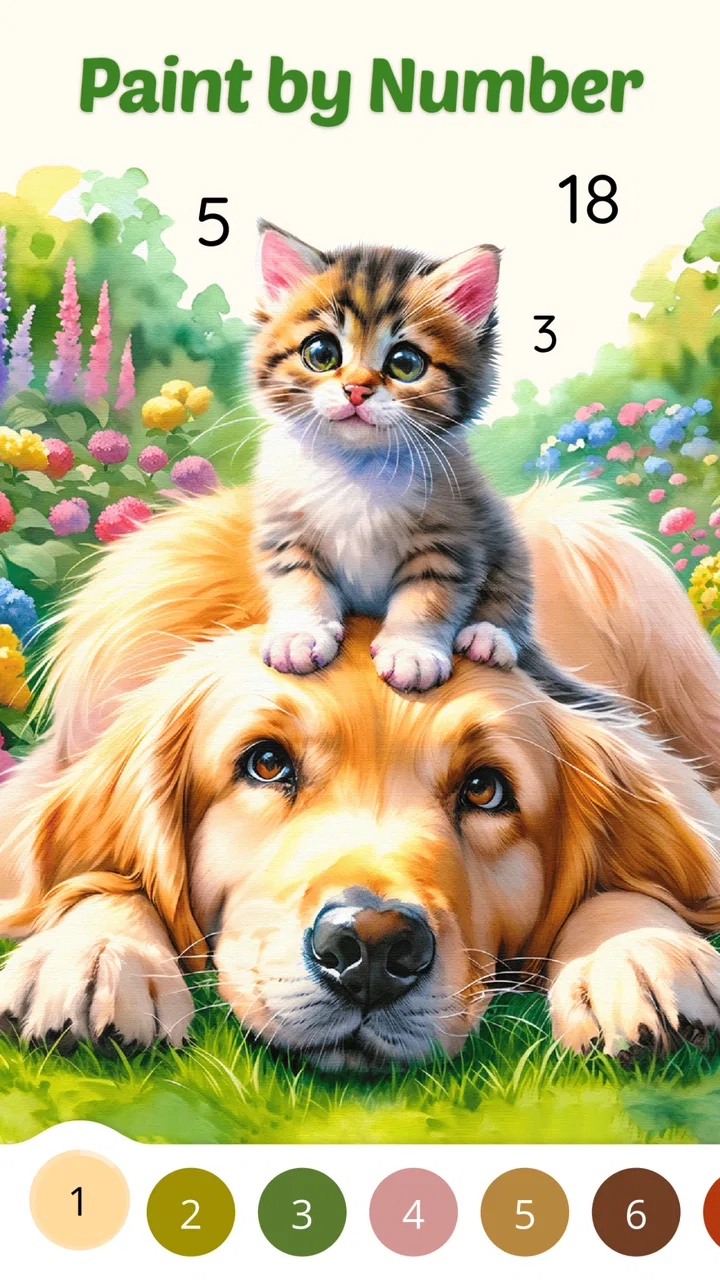
Color Aura: Paint by number
- 4.6
- Rating
- 1.00M
- Installs
- Free
- Price

 Analysis by App-foxy
I came away from Color Aura: Paint by number with a simple impression: it is a relaxing casual game that understands the appeal of quiet, repetitive progress. Rather than asking me to react quickly or master complicated controls, it gives me a large collection of illustrations and lets me fill them in one numbered area at a time. That makes it a natural choice for short breaks, winding down before bed, or occupying my hands while I listen to something else.
The game is free to start, suitable for Everyone, and made by Oakever Games. Its average rating sits at 4.7 from around 3.4 thousand ratings, while its reach has passed one million installs. Those figures suggest that the format connects with a broad audience, but they do not remove the need to look at how the experience feels in daily use. For me, the main question is not whether coloring by number works; it is whether this particular version stays comfortable and satisfying after the novelty wears off.
Why the basic coloring loop works so well
The central activity is deliberately uncomplicated. I choose an artwork, select a color, and look for the numbered sections that match it. Completing one area gives me a small sense of progress, and finishing a whole illustration provides a clearer stopping point than an endless social feed. That structure is especially useful when I want an activity that occupies my attention without demanding much mental energy.
You May Also Like

 Blood Strike: 2.5 Anniversary
Blood Strike’s Loadouts Turn Every Drop Into a Tactical Gamble
A close look at Blood Strike’s custom loadouts: how fast access to signature weapons reshapes its battle royale rhythm, rewards preparation, and narrows the gap between fights.

 Pandora - Music & Podcasts
Pandora’s Music Is Easy to Start, but Harder to Recover
Pandora’s strength is its low-effort path from a seed to a station. Its weak spot is how much confidence it asks you to place in connection, setup, and quiet recovery.

 8 Ball Pool
 Is Built on Rivalries, Rematches, and Routine
A close look at the rivalries, rematches, shared routines, and unanswered safety questions that turn a quick pool match into a persistent mobile community.

 Samsung Music
’s Quiet Strength Is Playing What You Already Own
Its reach comes less from spectacle than from dependable access to a personal library. That simplicity is both the app’s strongest retention engine and its ceiling.

 AccuWeather: Weather Radar
AccuWeather Review: A Quick, Clear Forecast for Everyday Decisions
For everyday plans, the best forecast is the one you can understand quickly. AccuWeather makes rain timing, radar, and local conditions easy to act on, with a few trade-offs.

 Hill Climb Racing
Why Hill Climb Racing Still Turns Crashes Into One More Run
A tiny car, a bumpy hill and one more upgrade: Hill Climb Racing keeps resurfacing because its simple chaos makes every near-miss feel personal.
More From Our News Desk
View All News


What I like most is the way the numbered format removes the pressure to be artistically skilled. In a conventional coloring book, I have to decide which colors work together and accept that an awkward choice may change the whole picture. Here, the palette is guided by the design. I can focus on finding the remaining spaces and watching the image become more complete. It feels creative without requiring me to draw, shade, or understand color theory.
The collection is presented as containing more than ten thousand artworks, so the appeal depends heavily on variety. A large library is valuable because the right image changes with my mood. Sometimes I want something simple that I can finish quickly; at other times, I prefer a more detailed picture that gives me a longer, quieter session. The size of the collection makes this kind of browsing central to the experience rather than a minor extra.
There is also a useful psychological rhythm in the way the game breaks a picture into small tasks. If I only have a few minutes, I can complete several sections and stop without feeling that I abandoned a larger project. If I have longer, I can continue until the illustration is done. That flexibility is one reason I see it as more practical than a physical coloring book for people who move between rooms, commute, or want something immediately available.
A practical way to use it during an ordinary day
My preferred use case is a short transition between demanding tasks. After answering messages or finishing work, I can open an illustration and spend ten minutes filling areas instead of reaching for another stream of notifications. The numbered prompts give my eyes one clear job, while the repetitive tapping creates a gentle break from writing and decision-making.
It can also work well as a low-effort evening activity, although I would still adjust screen brightness and avoid treating any game as a guaranteed sleep aid. The important benefit is that the session has a visible goal. I am not endlessly scrolling through new content; I am moving toward a finished image. That distinction makes the time feel more intentional.
For families, the Everyone rating makes the game broadly approachable. A younger player can understand the basic interaction quickly, while an adult may appreciate the calming routine. I would still supervise a child’s device use in the usual way, particularly around optional purchases, but the core idea is much easier to explain than a competitive game with complicated objectives.
Another useful workflow is to choose a picture before starting a break rather than browsing indefinitely. The artwork library can become part of the distraction if I spend too long deciding. I get more from the game when I pick an image based on a simple rule: a small picture for a short pause, a detailed one for a longer session, or a familiar subject when I want the activity to feel especially easy.
Where it feels stronger than ordinary alternatives
Compared with a paper coloring book, the obvious advantage is convenience. I do not need pencils, an eraser, a table, or a place to store unfinished pages. The game also handles the precision of numbered sections for me, which avoids the frustration of coloring outside narrow shapes. For someone who likes the idea of coloring but dislikes preparing materials, this is a meaningful improvement.
Compared with a standard puzzle game, the pressure is much lower. There is no apparent need to beat a timer or protect a streak in order to enjoy the basic activity. That makes it better suited to people who want a calm diversion rather than a challenge. I can stop after a few taps without feeling that I have failed a level.
It also differs from a general drawing app. Drawing tools offer more freedom, but they ask me to create the image myself and may feel intimidating when I am tired. Color Aura gives me a finished composition to follow. The trade-off is clear: I receive less artistic control, but I get a more predictable and accessible result.
Against other digital coloring games, the large artwork library is the most persuasive point. A smaller selection can become repetitive quickly, especially for someone who plays every day. Here, the breadth gives me more opportunity to find subjects that fit my mood. The experience is still built around the same familiar paint-by-number idea, so the library has to carry much of the long-term interest.
The small decisions that improve the experience
I recommend treating each illustration as a session rather than trying to clear the entire catalog. The enormous selection can create the same problem as a large streaming library: too many choices make it harder to begin. Picking one image and committing to it for a few minutes keeps the game focused and makes completion feel more rewarding.
I also find it better to use the game when I want guided concentration, not when I am looking for genuine creative expression. The numbered system gives me a satisfying path, but it does not let me freely reinterpret the artwork. If I want to experiment with unusual palettes, practice drawing, or develop a personal style, a blank canvas or traditional coloring materials will be a better fit.
Another trade-off is precision. Numbered coloring is accessible because the game tells me what to do, yet that same guidance can make the activity feel mechanical. I enjoy it most when I accept the repetition as the point. If I start judging it by the standards of a full art application, it will inevitably seem limited.
For a more mindful session, I would turn off other distractions before opening it and choose a single picture with a clear stopping point. The game works best as a contained break, not as something I leave open while constantly switching between apps. Its simplicity becomes a strength when I give it a small, defined role in my routine.
The main weakness: calm can become repetitive
The same loop that makes the game approachable can also limit its appeal. Tapping matching numbered sections is soothing for a while, but it does not offer the variety of decisions found in strategy games, word puzzles, or drawing tools. After several sessions, I may want more control or a stronger sense of challenge. The artwork changes, but the fundamental interaction remains familiar.
That is not a flaw for everyone. In fact, people seeking a predictable way to relax may consider the repetition a benefit. My concern is mainly about expectations. The store summary emphasizes calm, focus, and creativity, and I think the first two are more convincing than the last. I feel focused while coloring, but my creative contribution is limited to following the assigned colors and completing the composition.
The large catalog may introduce another kind of friction: browsing can compete with coloring. When there are thousands of possible artworks, the discovery process needs to feel manageable. I would prefer to spend most of my time filling a picture rather than repeatedly searching for the perfect one. Users who are easily distracted by choice may need to impose their own limits.
There is also a financial consideration. The game is free, but optional in-app purchases are listed at $12.99 per item. That does not change the value of the free starting experience, yet it is important to approach the catalog with a clear budget. I would not buy anything impulsively just because a particular picture or convenience feels tempting in the moment. Anyone sharing a device should also make sure purchase controls are handled responsibly.
The current version is 2.9.2 and it runs on Android 7.0 or later. That makes it accessible to people using older supported Android devices, although the exact feel can still depend on the phone or tablet’s screen size and responsiveness. A larger display is more comfortable for detailed illustrations, while a small phone keeps the game portable but may make tiny sections less pleasant to locate.
Who should choose it, and who should skip it
I think this is a strong match for someone who wants a quiet, guided activity with almost no learning curve. It suits adults who need a short mental reset, children who enjoy filling pictures without drawing from scratch, and casual players who prefer progress over competition. It is also a sensible option for people who like digital convenience and do not want art supplies taking up space.
The game is particularly useful when the goal is to settle attention rather than stimulate it. During a waiting period, a lunch break, or a calm evening at home, the numbered structure gives me something concrete to do without demanding a complicated plan. The ability to stop after a small amount of progress makes it easier to fit around an unpredictable schedule.
I would skip it if I need deep gameplay variety, competitive goals, or a genuine creative toolkit. Players who enjoy solving increasingly difficult puzzles may find the interaction too passive. Artists looking for brushes, layers, freehand control, or experimental color choices should use a drawing application instead. People who dislike optional purchases or large content libraries may also prefer a simple offline coloring book with a fixed number of pages.
It is worth remembering that relaxation is personal. Repetitive tapping calms me when I want a narrow focus, but another person may find it monotonous. The best test is to ask what kind of attention I want from a game: if I want to be guided gently, this format makes sense; if I want to make decisions and solve problems, it probably will not hold my interest for long.
My final view after weighing the trade-offs
Color Aura: Paint by number succeeds because it does not overcomplicate its purpose. Oakever Games has built a casual coloring experience around accessible controls, a very broad artwork library, and a steady sense of completion. I can open it without preparation, understand what to do immediately, and leave with a finished image or a little progress toward one.
Its limitations are equally clear. The activity is guided rather than deeply creative, and the repeated tap-and-fill loop may lose its charm for players who need constant novelty. The free entry point is appealing, but the optional $12.99 purchases mean I would use some restraint when exploring additional content. Those points keep me from calling it a universal recommendation.
For the right person, though, the balance is convincing. If I wanted a competitive challenge, I would choose another casual game. If I wanted to practice art, I would choose a drawing tool or physical materials. When I want a low-pressure digital coloring book that helps me focus on one small task at a time, this is where Color Aura earns its place.
My recommendation is therefore specific: try it if calm repetition, guided coloring, and a huge range of illustrations sound appealing. Give it a defined role in your day, keep purchases deliberate, and judge it by how well it helps you switch off rather than by how much traditional gameplay it contains. For that audience, it is a polished and approachable free game with enough content to make repeated visits feel worthwhile.
FAQs for Color Aura: Paint by number
01What is Color Aura: Paint by Number and how does it work?
Color Aura: Paint by Number is a relaxing and creative app that allows users to enjoy the art of coloring by numbers. Users select an image, and each section of the image is marked with a number corresponding to a specific color. By following these numbers, users can create stunning artworks without needing any prior artistic skills.
02Is Color Aura: Paint by Number available for both Android and iOS?
Yes, Color Aura: Paint by Number is available for download on both Android and iOS devices. You can find the app on the Google Play Store for Android users and the Apple App Store for iOS users. The app is designed to provide a seamless experience across all compatible devices.
03Are there any in-app purchases or subscription fees for Color Aura?
Color Aura: Paint by Number offers a free version with a variety of images to color. However, there are in-app purchases available, such as premium image packs and additional features. Some users may choose to subscribe for a fee to remove ads and unlock exclusive content for a more enhanced experience.
04Can I share my completed artwork from Color Aura on social media?
Yes, Color Aura makes it easy to share your completed artwork directly from the app. Once you finish coloring an image, you can save it to your device or share it on social media platforms like Instagram, Facebook, and Twitter with just a few taps, showcasing your creativity to friends and followers.
05Does Color Aura offer any features to help with stress relief?
Absolutely, Color Aura is designed with relaxation and stress relief in mind. The app offers a calming and meditative experience through its intuitive number-based coloring system. Users often find the process of coloring by numbers to be soothing, helping to reduce stress and promote mindfulness.
Pros
- User-friendly interface enhances creativity.
- Extensive color palette and design options.
- Regular updates with new templates.
- Offline mode available for uninterrupted use.
- Supports sharing artwork on social media.
Cons
- In-app purchases can be pricey.
- Occasional ads may disrupt workflow.
- Limited free templates without subscription.
- Some features require internet connection.
- High storage usage on device.

Color Aura: Paint by number
Gallery